▸ Native SSH client · iPhone & iPad

Stop fighting tmux and herdr on a touchscreen.

Keep every host connected, run saved snippets, open forwarded web UIs in an in-app browser, and work in tmux or herdr with tabs and panes that feel native. Checking on your coding agent, or any terminal app, from your phone? Paste it a screenshot, draft a prompt, hit Esc.

Download on the App Store

Free for one host · $1.99 once for unlimited hosts, no subscription · iOS 26+

Built on libghosttyNo data collectedNo subscriptionUniversal app: iPhone & iPad
Features

A full SSH client for tmux and herdr on iPhone and iPad

Servers & sessions

Every host, connected at once.

A homelab, a cloud VM, a build box. dotMux keeps several hosts connected at the same time: leaving a terminal doesn't disconnect it, so moving between servers is a tap, not a reconnect.

  • Group hosts into folders; each folder shows what's connected inside it
  • The host list is the switcher — live hosts are marked where you already look
  • A pill in the terminal shows how many hosts are live; jump to another without leaving the terminal
  • Pick a tmux session per host, or start a named one
Snippets & port forwarding

Commands on tap, web UIs on localhost.

Save the commands you keep retyping, and reach the web UIs that only listen on the server's localhost — no VPN, no port exposed.

  • Snippets, global or per host, run from the keyboard bar
  • A snippet can hold several commands, sent in order; a Press Return toggle decides whether it runs or waits for you
  • Local port forwards bound to 127.0.0.1 only, set once in the host editor
  • The Forwards panel shows each forward's state; Open loads it in an in-app browser
Native tmux & herdr tabs and panes

See what each window is doing, live.

dotMux speaks tmux control mode (tmux -CC) and herdr's own protocol, so your remote session isn't drawn as one big terminal: windows become tabs, panes become native views, and every operation runs through the multiplexer itself.

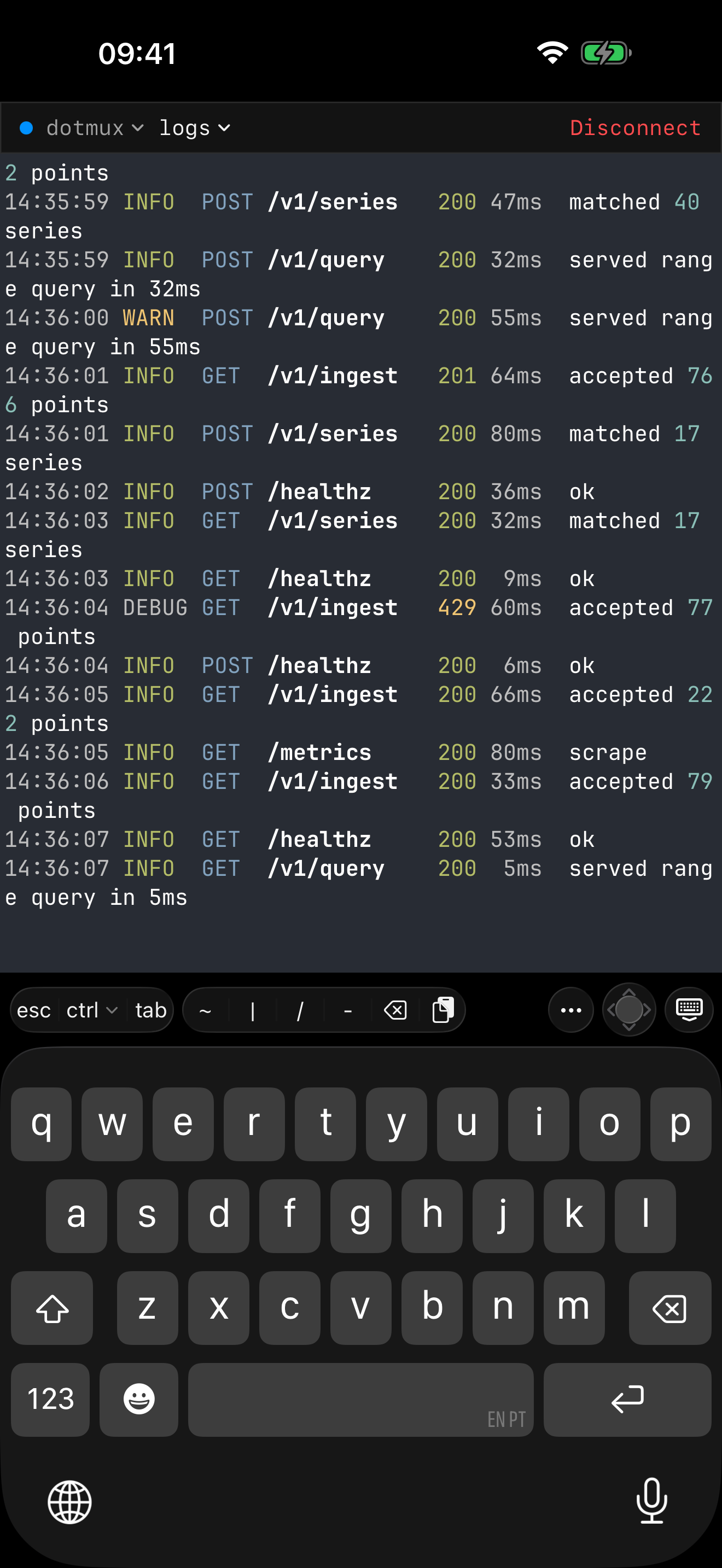
  • The window picker renders your real terminals, live — pick a window by what's in it
  • Split, resize and close panes by touch: focused full-screen on iPhone, side by side on iPad
  • No tmux or herdr on the host? dotMux falls back to a plain terminal
Built for coding agents

Everything a reply to your agent needs.

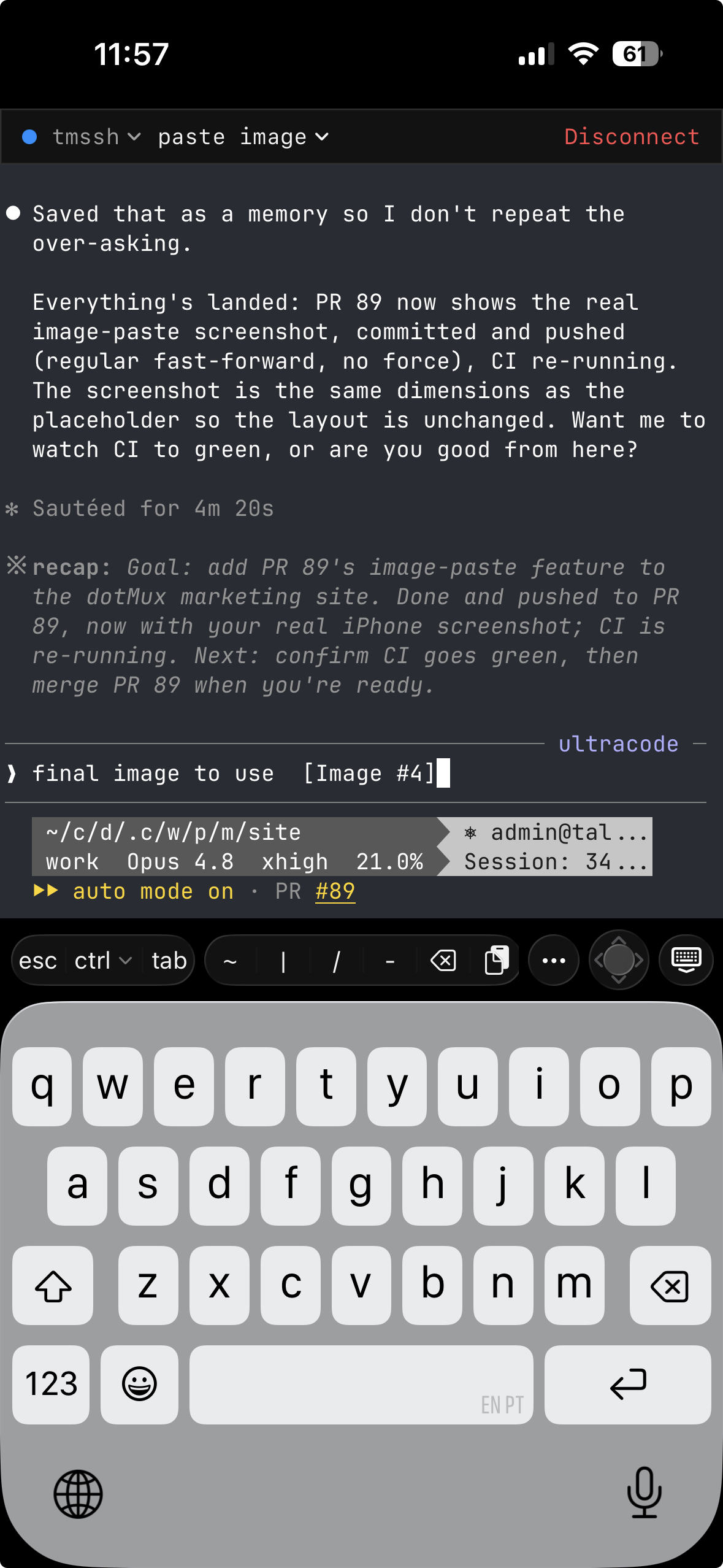
An agent waiting on you needs more than letters: a screenshot of the bug, a long prompt, an Esc to interrupt it. dotMux puts all of it on a phone.

  • Paste a screenshot into Claude Code: dotMux uploads it over SFTP to ~/.dotmux/paste/ on the host and types the path, attached as [Image #1]. No Enter is sent, so you add your prompt first.
  • Draft long prompts in a multi-line composer, sent in one go
  • Copy an agent's output with a long-press and drag, wrapped lines joined back into one; tap links, with the real destination shown first
  • Esc and Ctrl on a helper bar you can rebuild, and swipe to scroll — inside full-screen agents too
  • Run your agents under herdr and see each one's state — blocked, working, done — in the tab bar
iPhone, iPad & Duo

An iPad workstation, keyboard and all.

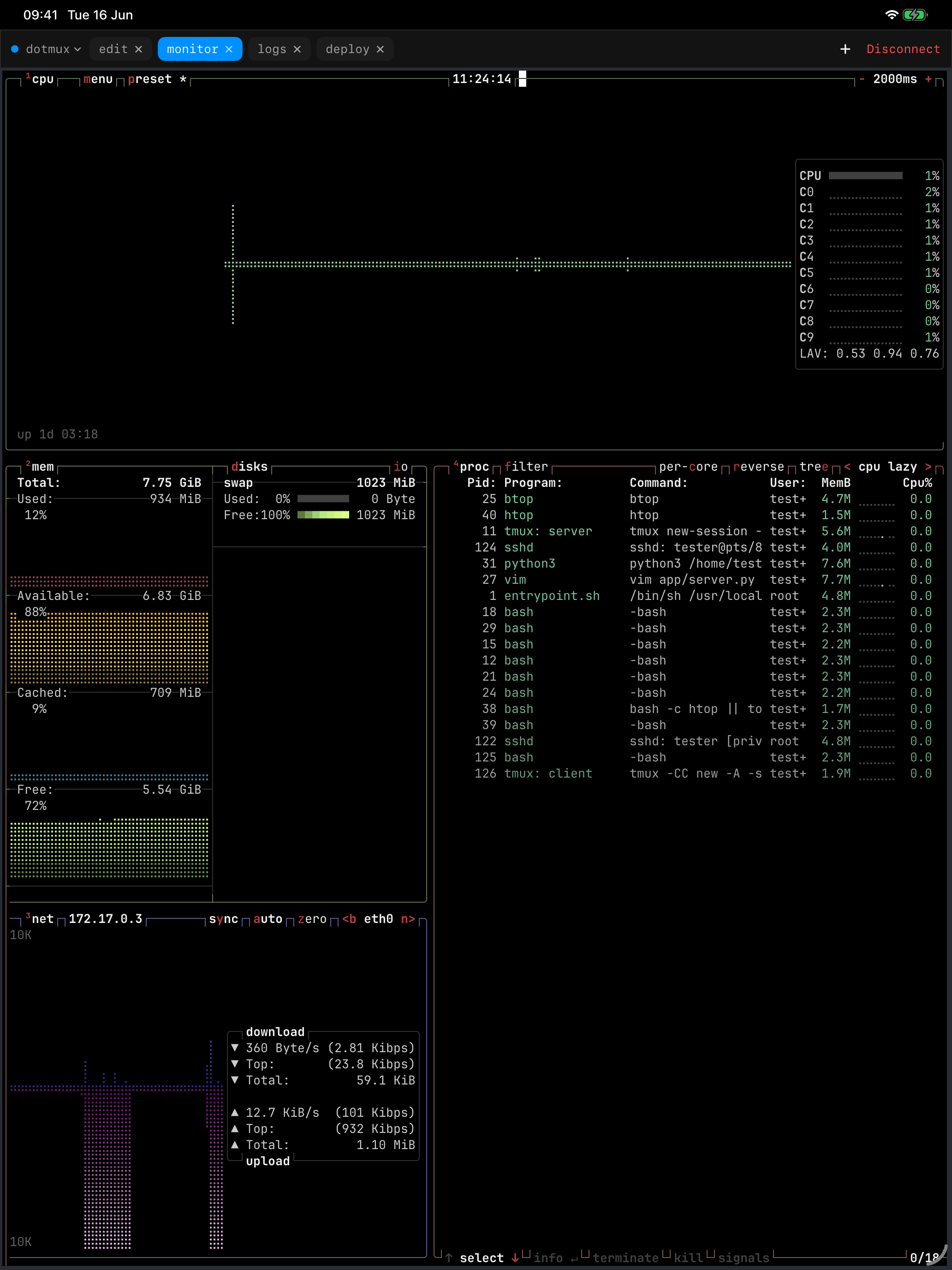
One universal app. On iPhone, each pane gets the full screen. On iPad, panes sit side by side — your agent, its diff and your logs at once — and you resize them by dragging the dividers.

  • ⌘T / ⌘W open and close windows, ⌘1–9 jumps to one, ⌘D splits, ⌃⌘-arrows resize; hold ⌘ for the full list
  • Right-click a pane with a trackpad for its menu
  • Open in New Window puts a host in its own iPad window, side by side with another
  • On iPhone Duo, the cover is a focused terminal; unfold it and the inner display lays out real splits
dotMux on iPad showing four live monitoring feeds side by side in native panes, rendered from a remote tmux window.
Security

Your credentials never leave your device.

dotMux runs no servers and has no account. It connects straight from your device to your machines, and the developer never receives your keys, passwords or traffic.

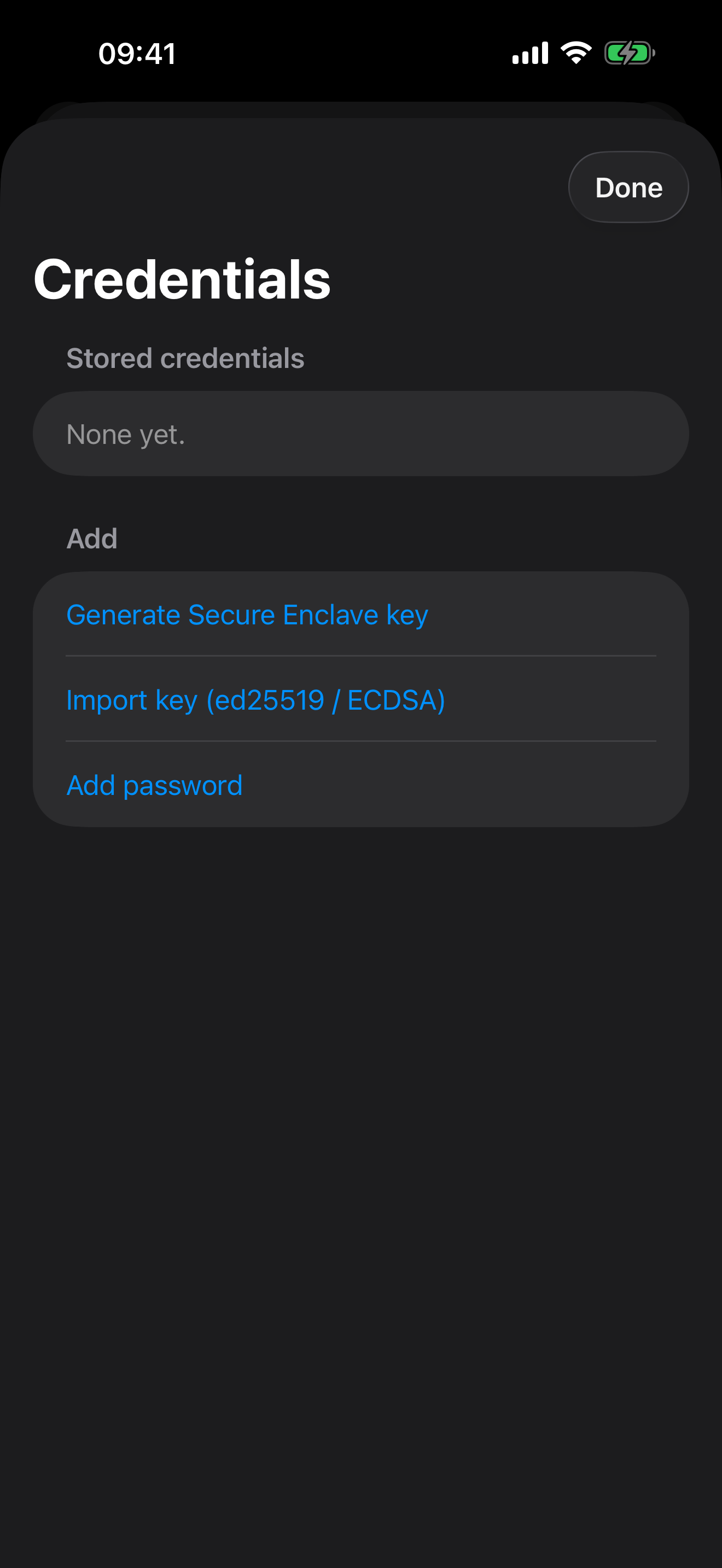
  • Generate a key inside the Secure Enclave: non-exportable, it only ever signs in-chip
  • Or import ed25519 and ECDSA (P-256) keys, passphrase-protected ones included
  • Face ID to open the app, plus a second Face ID gate on each credential, with a fixed two-minute grace period
  • Credentials stay in this device's Keychain, never synced to iCloud; trusted host keys are listed for review
The dotMux credential vault on iPhone offering to generate a Secure Enclave key, import an ed25519 or ECDSA key, or add a password.
Pricing

Pay once, if at all.

No subscription, no account, no trial clock.

Free

$0

One saved host, fully featured: tmux and herdr, every key type, Face ID, iPad multi-window.

Unlimited Hosts

$1.99 once

Save as many servers as you like. A one-time purchase, with Restore Purchases.

FAQ

Questions about tmux, herdr, agents and keys

Do I need tmux or herdr on the server?

No, but it's where dotMux shines. With tmux or herdr, your windows and panes become native tabs and views and survive iOS suspending the app. Without either, a host opens as a plain SSH terminal. tmux control mode →

What happens to my sessions when I lock the phone?

Your shells, builds and agents keep running on the server, inside tmux or herdr. When you come back, dotMux re-attaches to the session and rebuilds your tabs and panes where they were. Coming back after iOS suspends the app →

Which SSH keys can I use?

ed25519 and ECDSA (P-256) keys, imported by paste or from Files, or a key generated inside the Secure Enclave that never leaves the chip. Passwords work too. RSA keys aren't supported. Keys and passwords →

Does dotMux work with my coding agent?

Yes, and with any other terminal app. Agents run in tmux or herdr on your server like any other CLI, and dotMux is the terminal you reach them through. Paste an image and dotMux uploads it to the host and types its path — Claude Code attaches it as [Image #1]. Pasting images into Claude Code →

Can the developer see my keys or my sessions?

No. dotMux has no servers and no account. It connects straight from your device to your machines, and collects no data. Security and privacy →

What isn't supported yet?

Jump hosts (ProxyJump), an SFTP file browser, SOCKS, reverse and agent forwarding, and iCloud key sync are deferred. RSA keys are left out on purpose. Local port forwarding ships. What isn't supported yet →

What about mosh?

dotMux doesn't support mosh, on purpose. mosh runs a terminal emulator on the server and sends a picture of the screen, which drops inline images and newer terminal features. tmux and herdr cover dropped connections instead: your work keeps running, and reconnecting re-attaches you to it. Why not mosh →

More in the support center.

Leave the laptop. Keep every server close.

A native tmux and herdr client for iPhone and iPad, with real SSH keys and every host one tap away.